



Dealership Inventory Photos: 8 Tips to Boost VDP Views
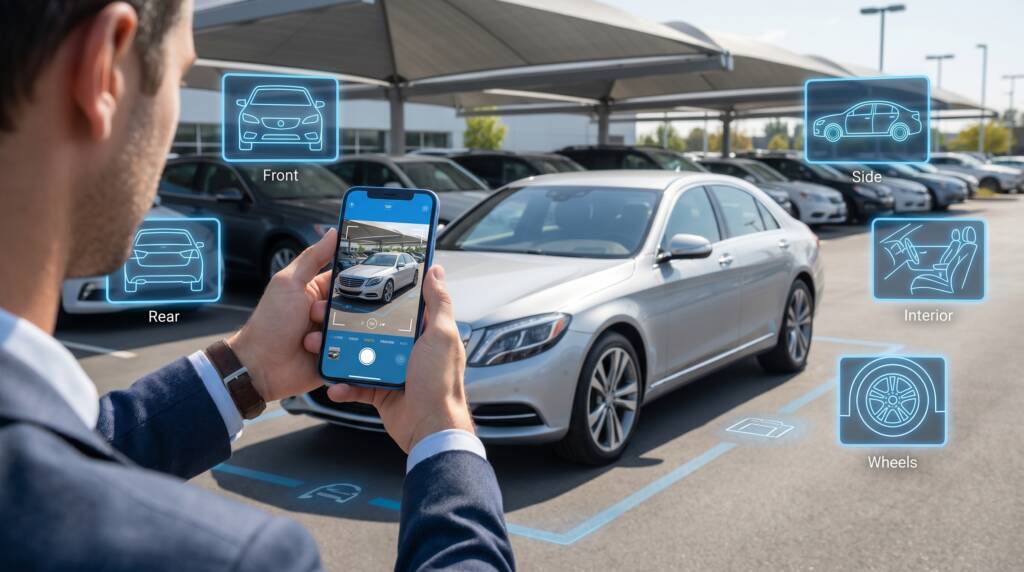
Dealership inventory photos are your highest-impact lever for VDP engagement, and most dealers underuse them. The photos on your listings decide whether your ad traffic converts or bounces.
- This guide gives your team a practical framework to:
- Nail the lighting, backgrounds, and angles that sell
- Understand why photo quality drives VDP views
- Build a repeatable, scalable photo workflow
TL;DR
- Custom photos lift used/CPO VDP click-through by 349% vs stock images.
- Listings with 40+ photos earn 64.8% higher VDP views.
- Photo standards fail because of process ownership, not technology.
- The biggest gap at most dealerships is the trade-in and auction intake pipeline.
- CarCutter’s mobile app and AI processing standardize photo quality at scale.
Why Dealership Inventory Photo Quality Impacts VDP Views and Shopper Engagement
Dealership inventory photos are a marketing function, not a logistics task. Every dollar you spend on automotive advertising drives traffic to your VDPs. The photos decide whether that traffic converts.
The data is clear. According to Cox Automotive:
- Custom photos lift used/CPO VDP click-through by 349% vs stock images
- New vehicle VDPs see a 133% lift
- Listings with 40+ photos earn 64.8% higher VDP views
Shoppers care deeply about visuals.JD Power reports that 90% of buyers consider photos extremely important, and 40% expressed willingness to buy based on images alone.
Do not forget your SRP thumbnails. The first image in your gallery competes with every other listing on the page. Clean backgrounds and consistent framing make yours stand out before anyone clicks.
Fix your biggest gap first: the trade-in and auction pipeline. Fresh trades often sit with zero photos for 3-5 days because nobody owns the intake process.
How to Set Up a Repeatable Dealership Photo Workflow
Consistency comes from process, not individual talent.
Start with a defined shot list. Every vehicle should include:
| Exterior | Interior | Detail |
|---|---|---|
| Front three-quarter (SRP hero) | Dashboard / cluster | Wheel close-ups |
| Rear three-quarter | Dashboard/cluster | Trim features (sunroof, tow) |
| Direct front and rear | Front and rear seating | Cargo area |
| Both side profiles | Center console/infotainment |
Target 30-40 photos per vehicle to hit the engagement threshold the data supports.
Prep before you shoot. Every vehicle must be clean and detailed, with lot tags and price stickers removed.
Assign clear ownership. Define each handoff: recon completion triggers staging, staging triggers capture, capture triggers QA, QA triggers publish. Assign a dedicated photo or merchandising coordinator with clear SLAs.
Use guided capture.CarCutter’s mobile app walks photographers through each angle with real-time AI quality checks, smart framing, and VIN scanning. It also supports offline capture with automatic upload.
For how this workflow supports rankings, see car dealer SEO.
Lighting, Backgrounds, and Angles: The Essentials of Dealership Inventory Photography
Even with a solid workflow, the technical fundamentals determine your output quality.
Lighting
- Natural, overcast light is the most forgiving and consistent
- Avoid direct sunlight, which creates harsh shadows and reflections
- In northern climates, use an indoor staging area with diffused lighting
Backgrounds
- Cluttered lot backgrounds distract from the vehicle
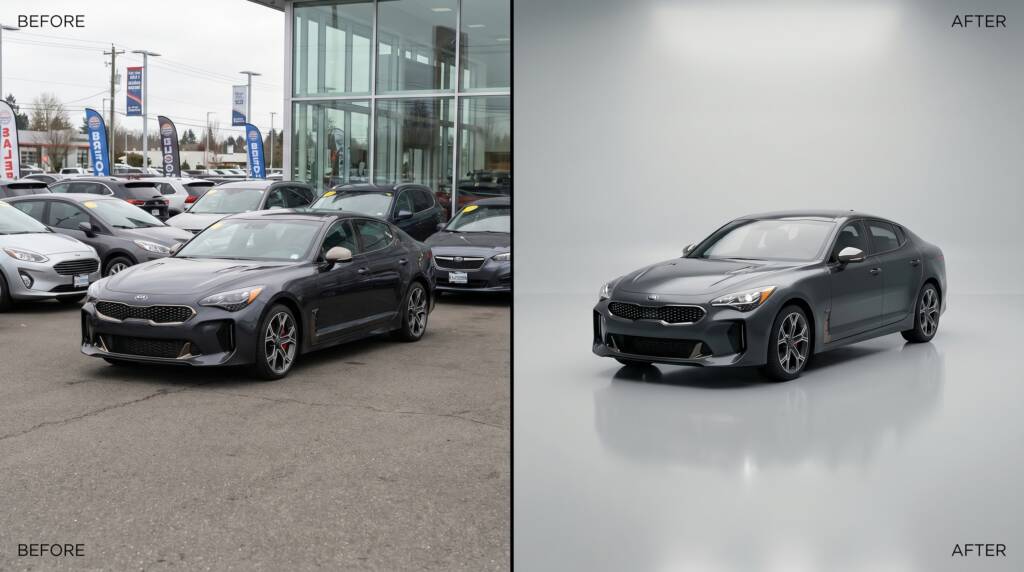
- CarCutter’s AI background processing replaces inconsistent backgrounds automatically, with realistic lighting, shadows, and reflections
- It offers both 2D backgrounds and true 3D virtual showrooms with full branding
Angles
- Shoot at eye level or slightly below so the vehicle looks substantial
- For interiors, shoot from a buyer’s perspective
- Keep consistent distance and framing for uniform SRP tiles
This consistency feeds your car dealer SEO performance, since professional imagery improves engagement signals that search engines reward.
If you want a faster path to consistent, professional inventory visuals, CarCutter’s AI processing handles background replacement, lighting correction, and formatting across your entire inventory.
Scaling Your Photo Operation Across Multiple Rooftops
Maintaining quality across 5, 10, or 25 locations is a different challenge.
Centralize your standards. Document your shot list, staging requirements, lighting preferences, and background specs. Track on a group dashboard:
- Photo count per listing
- Time from recon completion to live VDP
- VDP engagement by location
Automate the processing. One 25-rooftop group using CarCutter cut capture-to-publication time by 23 minutes per vehicle, down from workflows that often exceeded 60 minutes. CarCutter Hub provides real-time analytics, and DMS/IMS integrations publish processed images straight to your inventory system.
Do not ignore aged inventory. If a unit sits 45+ days with the same photos, reshoot with fresh angles or seasonal context.
Layer in more content once the pipeline is solid:
- 360-degree spins build on the same source photography
- Video walkarounds add engagement, especially for used vehicles above $25K
For more on immersive options, see augmented reality car dealerships.
Key Takeaways
Dealership inventory photos are your most direct lever for VDP engagement and lead generation.
- Custom photos crush stock: 349% CTR lift for used vehicles
- 40+ photos per listing is the engagement threshold
- Process ownership, not technology, determines photo quality
- Fix the trade-in photo gap first
- CarCutter’s mobile app, AI processing, and Hub analytics maintain quality at scale
To benchmark your photo workflow against best practices, CarCutter website can help you assess where automation fits.
Frequently Asked Questions
Aim for 30-40+ photos per vehicle. According to Cox Automotive, listings with 40+ photos see 64.8% higher VDP views. Cover the full exterior from multiple angles, complete interior, dashboard, cargo, and any standout features.
Custom photos show the actual vehicle a buyer will see on the lot, including real condition, color accuracy, and specific features. Stock images are generic and do not differentiate your inventory. Cox Automotive data shows custom photos increase used/CPO VDP click-through by 349%.
Overcast natural light is the most consistent and forgiving option. Avoid direct sunlight, which creates harsh shadows and reflections. For indoor shooting, use diffused lighting. Dealers in northern climates with winter challenges can solve seasonal issues with indoor staging areas and consistent lighting setups.
Centralize your standards: documented shot lists, staging requirements, and background specifications. Use AI processing to automate background replacement and formatting. Monitor compliance with a group-level dashboard tracking photo counts and time-to-list by location.
Fresh trades and auction purchases often sit with zero photos for 3-5 days because nobody owns the intake photo process. This means your newest and most marketable inventory has the worst online presentation. Assign photo capture as an explicit step in the intake workflow.
Yes. If a vehicle has been listed 45+ days with the same photos, consider a reshoot with new angles, updated feature callouts, or seasonal context. Fresh visual content signals active inventory management to shoppers.
AI automatically separates the vehicle from its background and places it into a clean, professional setting with realistic lighting and shadows. This produces studio-quality results from lot-captured photos, ensuring visual consistency regardless of where or when the vehicle was photographed.
Video walkarounds are an effective additional layer, particularly for higher-priced used vehicles above $25K where shoppers want more visual information. Photos remain the foundation, but video extends time on page and helps buyers assess the vehicle more thoroughly.