


VIN Number Lookup: The Best VIN Decoders and Tools in 2026
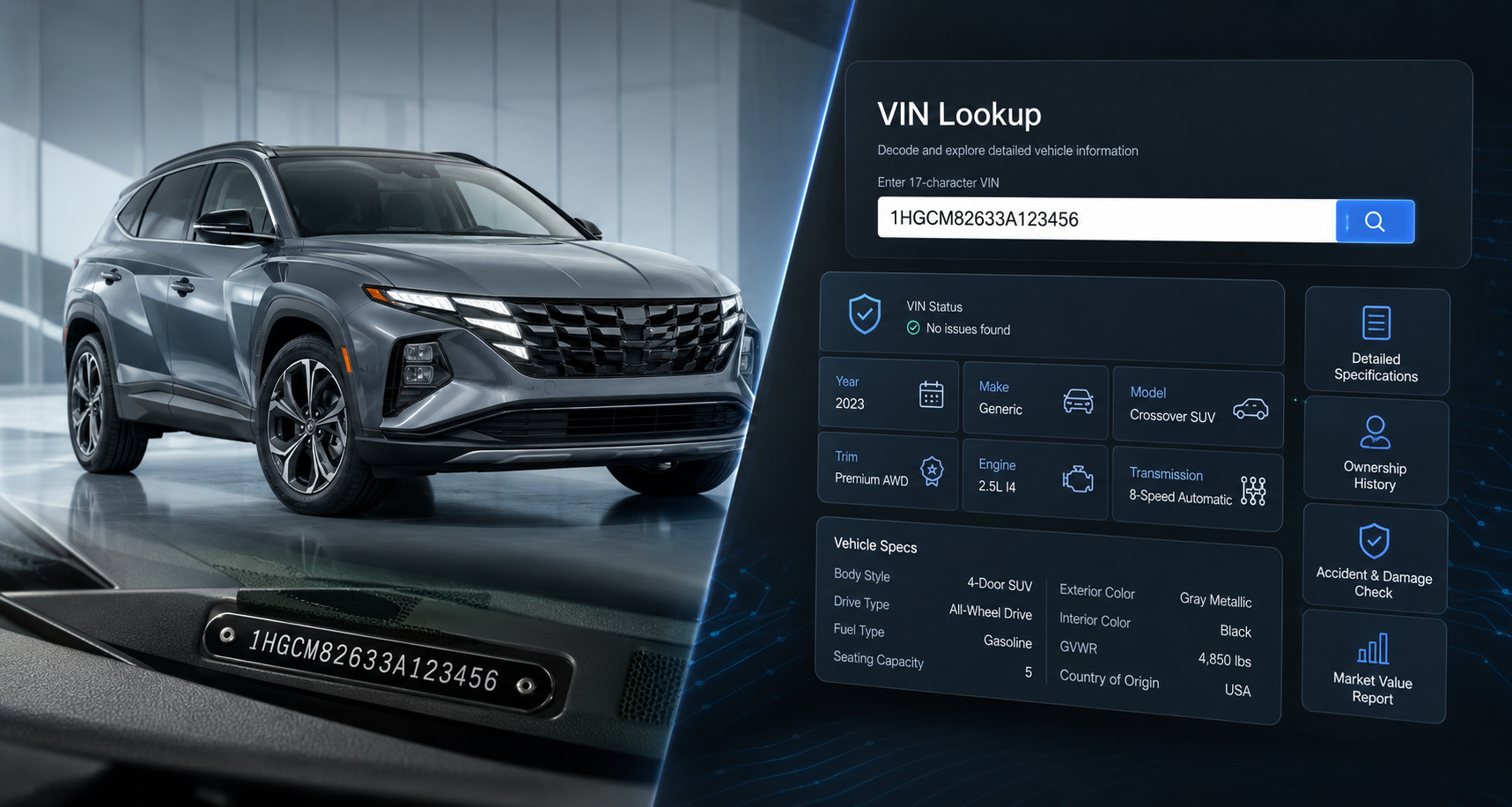
Your car has a 17-character fingerprint called the VIN, short for Vehicle Identification Number. Punch it into the right tool and you can pull up the car’s specs, its open safety recalls, its full ownership history, even a firm offer to buy it. Here’s the thing, though: no single tool does all of that, and some of the data people happily pay for is actually free. So this guide keeps it simple and shows you exactly which tool to reach for depending on what you’re trying to do.
TL;DR
- A VIN is your car’s unique 17-character ID (every car since the 1981 model year has one). It tells you what the car is, not who owned it.
- No single tool does everything. Match the tool to the job:
- Decode specs and recalls (free): NHTSA VIN decoder.
- Check accident and ownership history (paid): CARFAX Vehicle History Report.
- Get a resale offer (free to sellers): Carvana or another instant-offer tool.
- Manage inventory (dealers): vAuto Provision.
- Don’t pay for what’s free. Basic spec decoding costs nothing. Only a history report is worth opening your wallet for.
- A spec decoder is not a history check. They answer totally different questions, so use both before buying used.
- For dealers: decoding a VIN is only step one. The listing’s photos are what actually convert the shopper.
What a VIN is (and how to read it)
A VIN is the unique 17-character code that every car built since the 1981 model year carries. It only uses capital letters and numbers, and it skips the letters I, O, and Q on purpose so nobody mixes them up with 1 and 0. That’s the VIN standard (ISO 3779) at work.
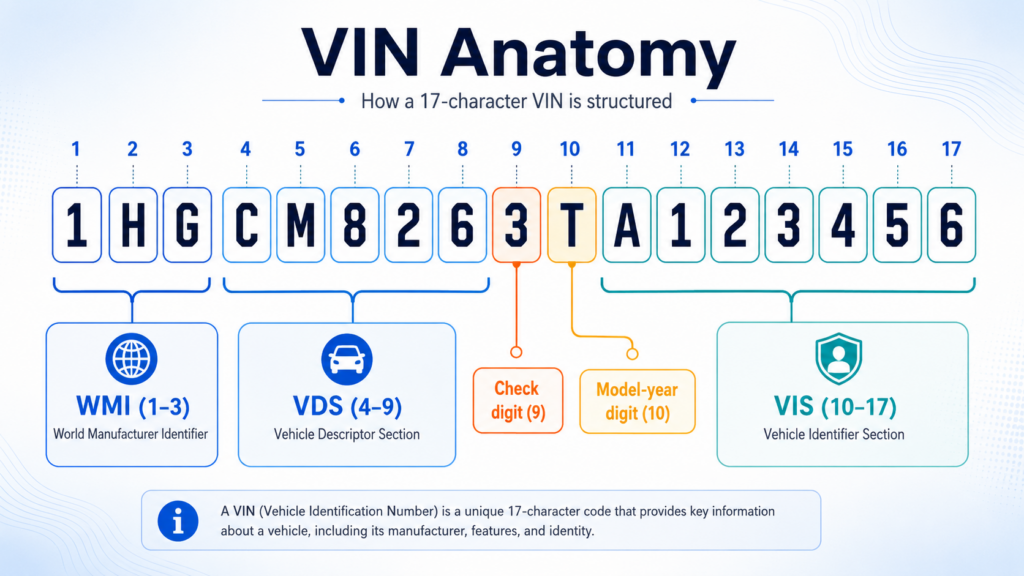
Those 17 characters aren’t random. They break into three chunks:
- Positions 1 to 3, the World Manufacturer Identifier (WMI): who built the car, and where.
- Positions 4 to 9, the Vehicle Descriptor Section (VDS): the model, body style, and engine, plus a check digit at position 9 that quietly confirms the VIN is legit.
- Positions 10 to 17, the Vehicle Identifier Section (VIS): position 10 gives you the model year, position 11 is the assembly plant, and the rest is the car’s serial number.
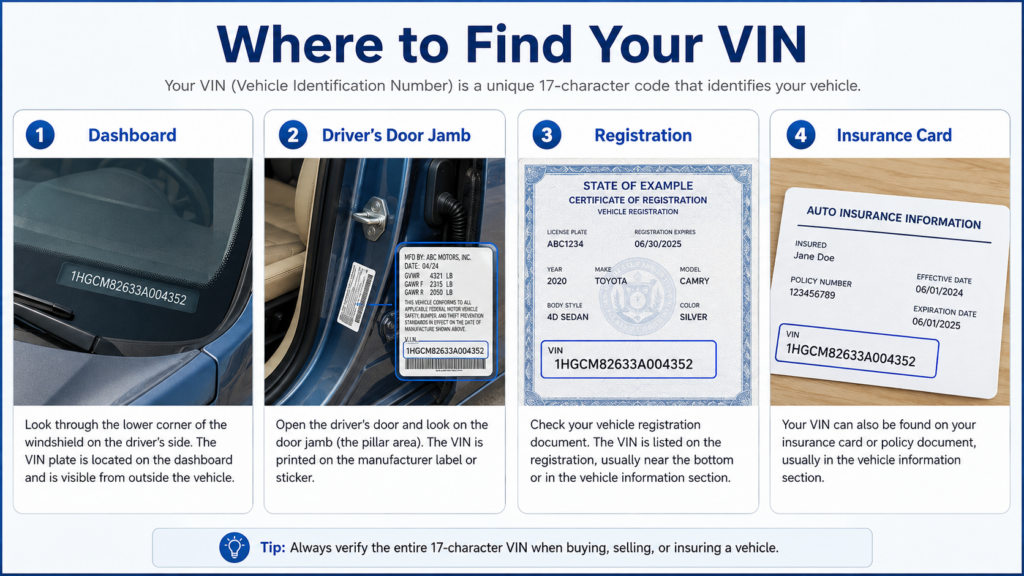
Need to find yours? Look at the driver’s-side dashboard through the windshield, the driver’s door jamb, your registration, or your insurance card.
Which VIN tool for which job
Pick your tool based on what you actually want to do, not on whatever shows up first in Google.
| Your job | Best tool | What it returns | What it does not return | Cost |
|---|---|---|---|---|
| Decode factory specs and recalls | NHTSA vPIC decoder | Make, model, year, plant, engine, safety recalls | Ownership, accidents, title, mileage | Free |
| Confirm trim/specs quickly | Edmunds / AutoZone / DecodeThis | Specs, trim, some fuel-economy data | Full history | Free |
| Check accident and ownership history | CARFAX / AutoCheck | Title issues, accidents, service, owners | Live resale price | Paid |
| Get a resale price fast | Carvana / KBB Instant Cash Offer | A firm offer from your VIN or plate | Detailed history report | Free (to seller) |
| Manage inventory at a dealership | vAuto Provision | Market-based appraisal and pricing across inventory | Consumer-facing report | Dealer subscription |
Decode specs and recalls, for free
Want the factory specs and any open safety recalls? Start with NHTSA’s free VIN decoder. It’s free, it’s public, and it pulls straight from the data manufacturers report, so it’s about as trustworthy as free gets. It’ll tell you what the car is (make, model, year, engine, where it was built), but it won’t tell you who owned it, whether it’s been in a wreck, or what the title looks like. Free decoders from Edmunds and AutoZone cover similar spec-level ground. Want to go deeper? Here’s how to use the NHTSA VIN decoder and its free API, the best free option for most people.
Check the history, and yes, pay for it before you buy
Specs won’t warn you about a flood-damaged car or a salvage title. For that, you want a paid history report. Even Carfax says it plainly: for a car’s history, the best VIN lookup is a CARFAX Vehicle History Report, which pulls together reported accidents, title branding, service records, and how many owners it’s had. Bottom line, don’t buy a used car on specs alone.
Sell your car with nothing but the VIN
Selling? You don’t have to decode anything yourself. Carvana’s Sell My Car tool gives you a real offer in about two minutes from your VIN or license plate, all online. Just know what you’re signing up for: instant cash offers usually come in around 10% to 15% below what you’d get in a private sale, which is the price you pay for speed and skipping the haggling. Offers are typically good for about seven days, so you’ve got time to shop a couple around. More on that here: how to sell your car to Carvana and keep your offer.
How dealerships use the VIN, where a scan becomes a sale
For a dealership, a VIN isn’t trivia. It’s the first step in getting a car sold. One scan can pull the specs, appraise the car against live market data, and start building the listing. Tools like vAuto Provision, used by more than 14,000 dealers, run that whole “VIN scan to sale” process to price and turn used inventory faster. (Related reading: what vAuto is and how it fits your inventory stack.)
But here’s the catch: good data and a sharp price only matter if the listing gets the click. Cox Automotive’s Car Buyer Journey study found that 92% of vehicle purchases start online, and most of them run through marketplaces. That makes the vehicle detail page, and especially its photos, the last stretch before the sale. The specs get the car listed. The photos are what actually get it sold.

Common mistakes to avoid
- Paying for data that’s free. Basic decoding costs nothing at NHTSA. Only a history report is worth paying for.
- Treating a spec decoder like a history check. They answer completely different questions.
- Taking the first offer. Grab two or three. They’re free and good for about a week.
- Assuming a decoder verifies the title. Title status comes from a history report or your state DMV, not a spec tool.
The bottom line
Keep it simple and match the tool to the job: NHTSA to decode, Carfax to check history, Carvana to sell, and dealer platforms to manage inventory at scale. And if you’re a dealer, remember that decoding the VIN is just the start. What buyers actually see is the listing, so that’s where the sale is won or lost.
For dealers: CarCutter automatically turns your VIN-scanned inventory into clean, consistent photos that are ready to convert. See how it works for dealerships
FAQ
For specs, yes. Free tools like the NHTSA decoder pull from manufacturer-reported data, so the make, model, year, and engine details are solid. What free tools don’t include is accident, title, and ownership history, so they’re reliable for what they cover, just not a substitute for a paid history report.
A decoder reads the specs built into the VIN itself, meaning what the car is. A history report adds everything that happened after the car left the factory: accidents, title branding, service records, and previous owners. You usually want both before buying used.
Some tools accept a license plate (Carvana does, for example) and convert it to a VIN behind the scenes. But the VIN is the universal key, so if you have it, use it.
A VIN isn’t secret. It’s visible through your windshield, and buyers legitimately need it. Just don’t pair it with personal documents on sketchy sites, and stick to reputable tools.