


NHTSA VIN Decoder: How to Use the Free Government VIN Lookup
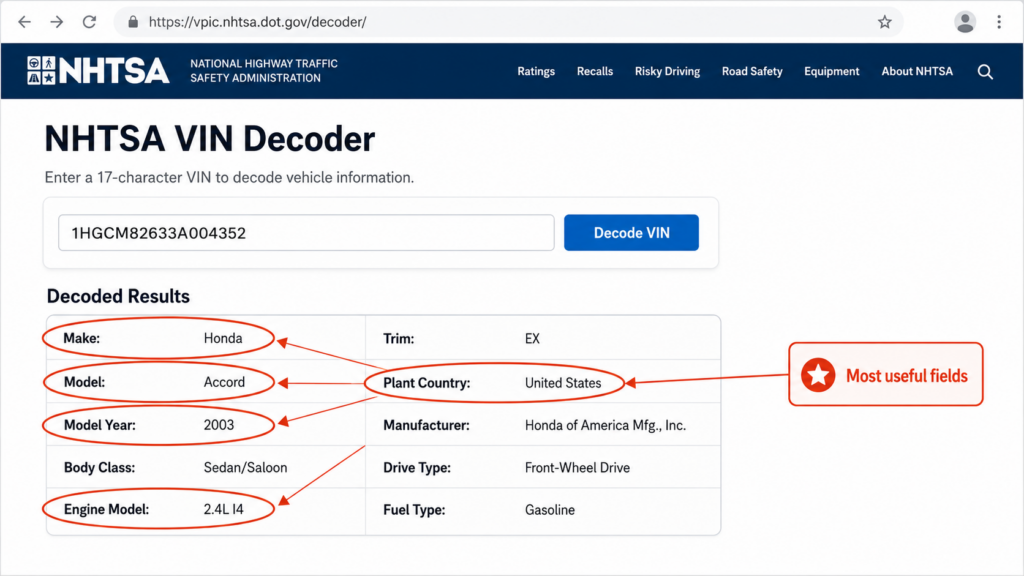
The NHTSA VIN decoder is a free, public tool that decodes the manufacturer info packed into any 17-character VIN, things like make, model, year, body type, engine, and where the car was assembled. It’s run by the U.S. National Highway Traffic Safety Administration and pulls from the data manufacturers report, which makes it one of the most trustworthy free VIN tools out there. What it won’t show you is the car’s ownership, accident, title, or mileage history.
What the NHTSA decoder does
The NHTSA VIN decoder (powered by NHTSA’s vPIC database) reads the data manufacturers bake into the VIN and gives you back the car’s specs. Since the source is manufacturer-reported and government-maintained, it’s reliable when you just want to confirm what a car actually is.
Use it to:
- Confirm the make, model, and model year.
- See the body class, engine, and where the car was built.
- Check that a VIN is valid before you buy or list a car.
Want to know about open safety recalls? That’s a separate NHTSA tool, the Recalls Look-up, which also takes a VIN and tells you whether that specific car has a recall that hasn’t been fixed.
What it won’t do
This is where people get tripped up. The NHTSA decoder gives you specs, not history. It won’t tell you:
- How many owners the car has had.
- Whether it’s been in a reported crash or flood.
- Whether the title is clean, salvage, or rebuilt.
- The real mileage.
For any of that, you’ll need a paid history report like CARFAX or AutoCheck. Our full comparison of VIN lookup tools walks through which tool fits which goal.
How to use it, step by step
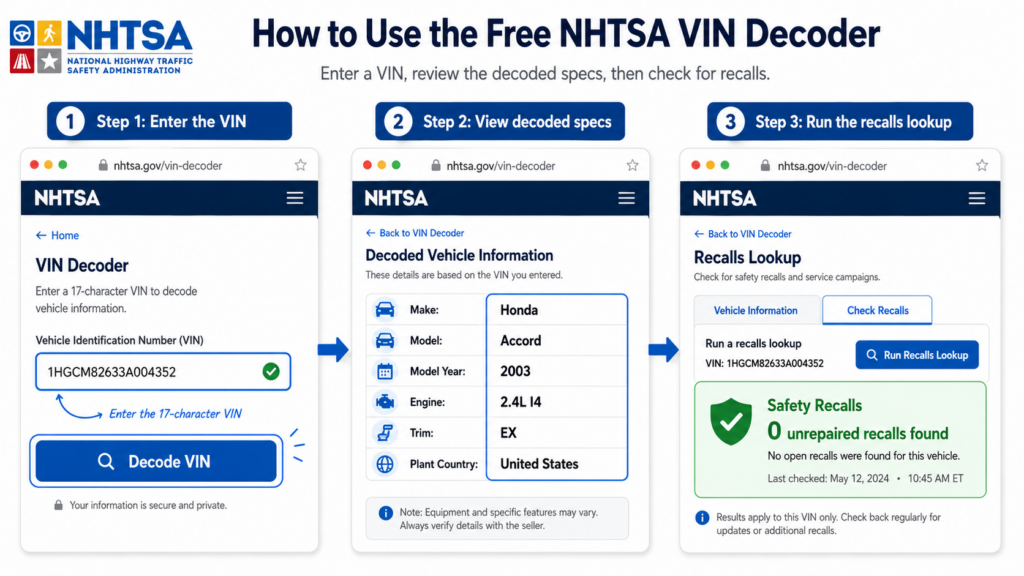
- Go to the NHTSA VIN decoder.
- Type in the full 17-character VIN. (Partial VINs work too, for a best-effort decode.)
- Look over the decoded specs.
- To be safe, run the same VIN through NHTSA’s Recalls Look-up to check for open recalls.
For developers and dealers: the free vPIC API
NHTSA also offers its decoder as a free vPIC API. You can decode one VIN or a whole batch, and the “Decode VIN Flat Format” endpoint returns results in a flat file that’s easy to work with in code. Pass in the model year and you’ll get more accurate results.
For a dealership, this is where the inventory workflow begins. A VIN scan feeds decoded specs into your system, and pricing tools like vAuto use that to appraise and price the car. The API means you can standardize year, make, model, and trim across your entire inventory without typing any of it in by hand.
From a decoded VIN to a listing that sells
Decoding is just step one. Once a car’s specs are in your system, the thing shoppers actually judge is the listing, and its photos. Cox Automotive’s Car Buyer Journey study found that 92% of purchases start online. Accurate VIN data gets the car listed correctly. Professional, consistent photos are what get it clicked and sold.
For dealers: CarCutter automatically turns your VIN-scanned inventory into clean, consistent photos that are ready to convert. See how it works for dealerships
The bottom line
The NHTSA VIN decoder is the best free way to confirm a car’s factory specs, and with the recalls tool, its open safety recalls too. The free API makes it genuinely useful for dealers standardizing inventory data. Just remember it’s a spec tool, not a history report. For accidents, title, and ownership, you’ll still need a paid report.
FAQ
Yes, completely. It’s a public tool from a U.S. government agency, with no fee and no account required.
No. It decodes factory specs and, through the separate Recalls Look-up, open safety recalls. For accidents, title, and ownership, you’ll need a paid history report.
Yes. Use NHTSA’s Recalls Look-up, enter the VIN, and it’ll tell you whether that specific car has an unrepaired recall.
Yes. The free vPIC API lets you decode single VINs or batches, which is handy for dealers and developers standardizing inventory data.
Usually it’s an older vehicle (the 17-character format started with the 1981 model year) or a gap in what the manufacturer reported. Adding the model year to your query often improves the result.