



The 360 Car Spin, Explained: A Dealer’s Decision Guide
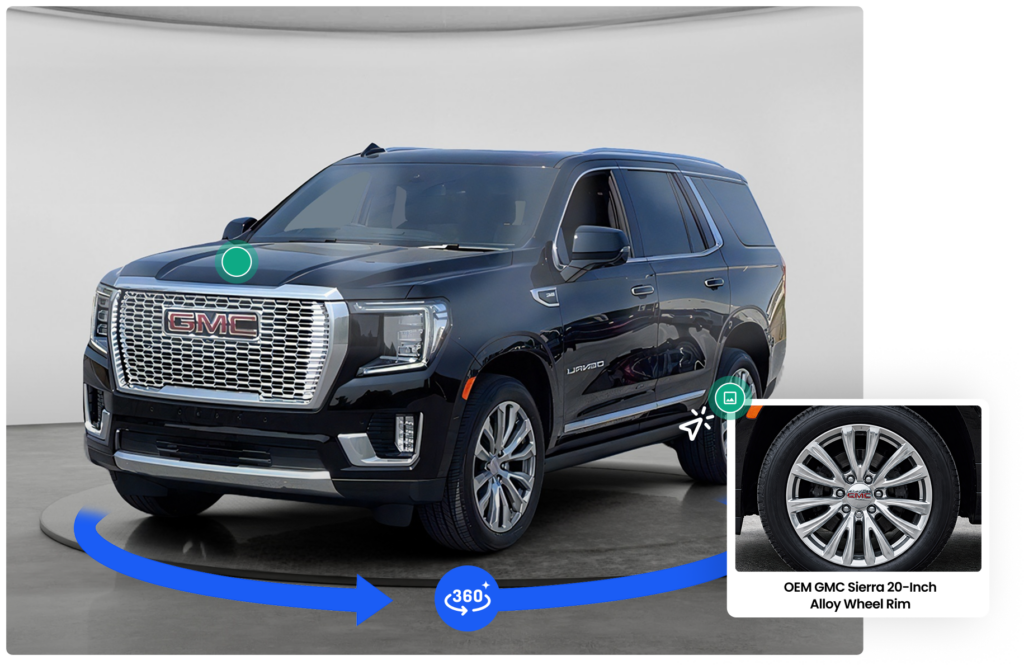
A 360 car spin is an interactive, rotatable exterior (and often interior) view of a specific vehicle that lets an online shopper drag to see the car from every angle, instead of clicking through a handful of flat photos. For a dealer, the practical question isn’t “is it cool?” It’s “does it earn its place in my acquire-to-frontline workflow, and does it move a metric I care about?” This guide answers that directly, gives you a cost framework you fill in with your own numbers, and ends with a 30-vehicle pilot you can run without buying anything permanent.
Short answer: A 360 spin is most defensible on used inventory, prioritized by price band and demand, and only worth it if capture fits inside your existing recon SLA without becoming the bottleneck. Prove it on 30 units before you scale.
TL;DR
- A 360 car spin is an interactive, drag-to-rotate view of a specific vehicle that replaces a handful of flat photos — and one capture pass also yields reusable stills.
- It’s most defensible on used inventory, prioritized by price band and demand (new cars can lean on OEM stock imagery).
- The real decision is workflow, not tech: capture must fit inside your recon SLA and never bottleneck time-to-web on high-intake days.
- Vendor stats vary — use the break-even formula and a 30-vehicle pilot (owner: used-car manager; co-primary metrics: SRP→VDP click-through and VDP-to-lead rate) to prove it on your own inventory.
- The same capture feeds your VDP, cross-channel ads, Google listings, and Performance Max assets — with different format/compliance rules per channel.
What a 360 car spin actually is
A 360 spin is a sequence of exterior frames stitched into a player the shopper controls. The best implementations also let you extract still images from the same capture and attach clickable hotspots to features or damage. The key distinction from a photo set: one capture pass produces an interactive spin and a library of standard stills you can reuse elsewhere.
In practice, a modern spin can be generated from the four standard exterior angles most stores already shoot — front, driver side, rear, and passenger side — with AI handling alignment, stabilization, and the photorealistic interpolation between those frames. CarCutter’s Next Gen 360° explainer walks through how that works from photos you’re already taking, without turntables or a separate editing step.
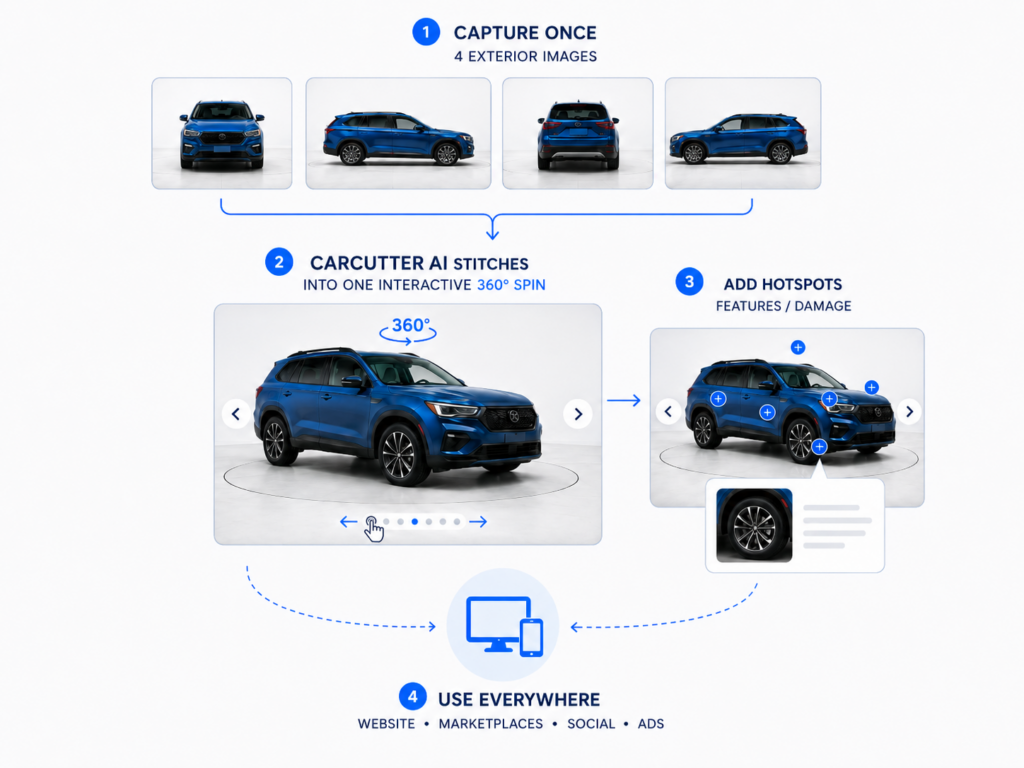
That “capture once, use everywhere” property is the real operational argument, because the same pass can feed your VDP, your cross-channel vehicle ads, your Google vehicle listings, and the asset library that Google Ads for car dealerships draws on — with the caveat that each channel has different format and compliance rules.
Does a 360 spin improve engagement?
It can, but treat any vendor figure as directional, not promised. CarCutter, for example, reports that interactive content drives roughly 53% higher engagement, around 3× longer time on page, and about 22% higher conversion than static photography. Those are vendor-reported figures rather than independently audited results, so use them as a reason to test — then benchmark your own SRP-to-VDP and VDP-to-lead conversion rates to measure the real impact on your inventory.
The way to know your own number is to measure it, which is the entire point of the pilot below.
Where capture fits: acquire → recon → frontline
The workflow decision matters more than the technology. Photography sits at the end of reconditioning, right before a unit goes frontline. If capture is slow, it delays time-to-web on exactly the days you least want delay — high-intake days after an auction run or a big trade week.
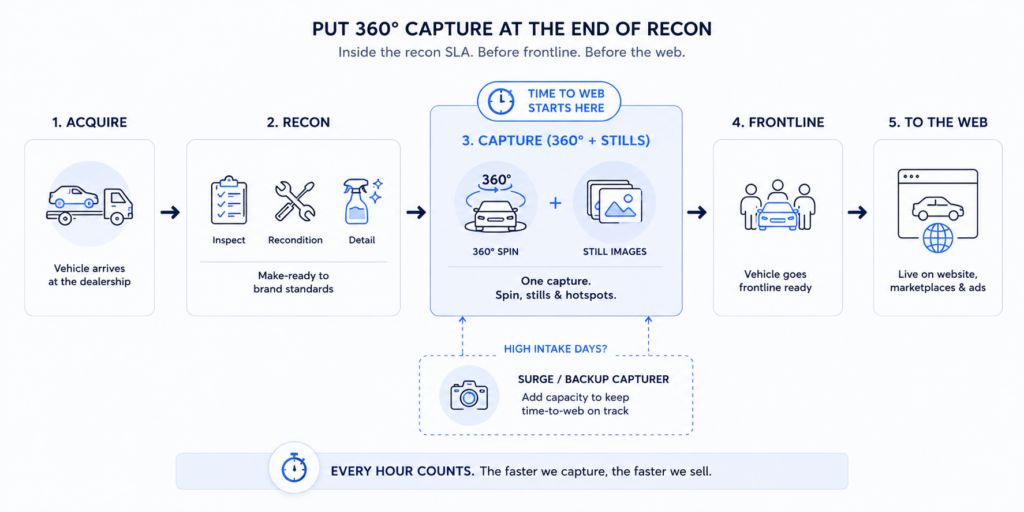
Surge coverage. Protect time-to-web on peak days with a written backup rule: name a backup capturer and set a high-intake trigger — when daily intakes exceed a store-set threshold (store-set: measure against your own intake data), pull a second capturer or extend capture hours so post-auction and big-trade days don’t create a merchandising backlog. Without this rule, a single busy day silently pushes fresh units off the web for days.
The governing rule: capture must sit inside your recon SLA and never become the constraint on high-intake days. If it does, you have a workflow problem, not a photography problem.
A capture standardization spec
(set once, apply everywhere)
Standardize capture so every unit produces reusable, cross-channel-ready assets from one pass. Treat this as your master spec; the downstream pages reference it rather than repeat it.
- Shot list: a fixed set of exterior angles plus key interior and feature/damage shots, defined per body style. (Confirm the exact angle count with your merchandising standard.)
- Minimum photo count: a defined range per unit (confirm — set to your merchandising standard).
- Resolution floor: at least the Google feed minimum of 100×100 px, and ideally at or above Google’s recommended 800×600 / 4:3 for feed-bound stills. Higher-resolution capture gives you more room to crop and reuse across channels. See Google vehicle listings compliance for the exact, verified feed specs.
- Per-channel aspect ratios: confirm current platform specs per channel before syndicating (see the capture-output matrix in vehicle ads across channels).
Should you spin used or new inventory first?
Prioritize used. Used units are unique — each has its own condition, options, and wear — so no OEM stock imagery can stand in, and buyers have more reason to inspect. New cars can often lean on manufacturer stock imagery, so the marginal value of a full spin is lower.
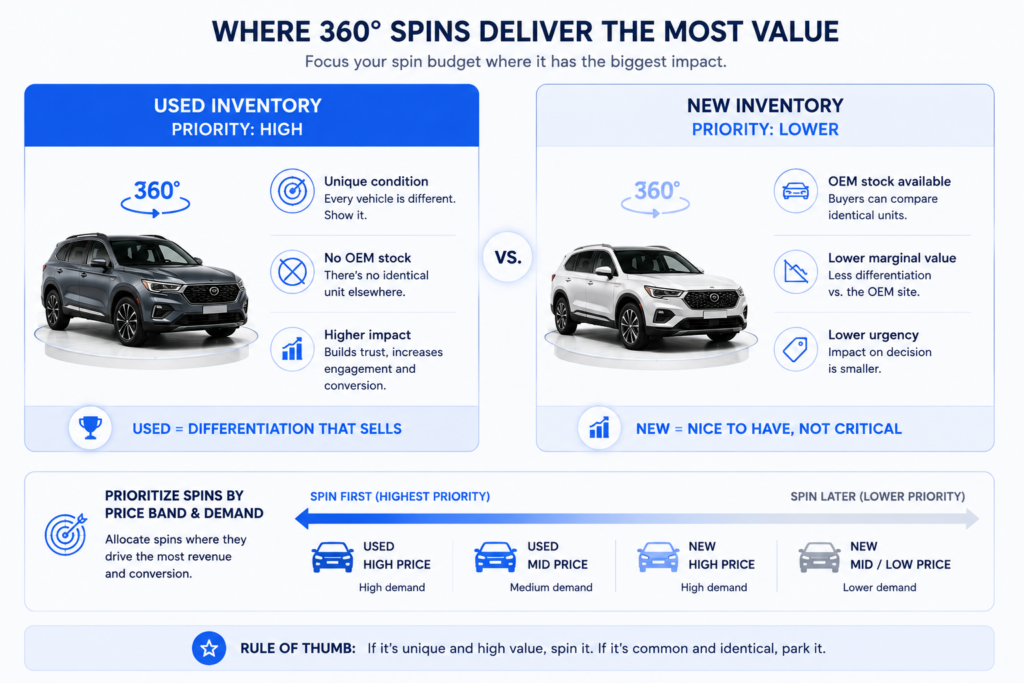
Within used, prioritize by price band and demand: spin higher-price-band and higher-demand units first, where a single additional lead is worth more and shopper scrutiny is highest. Work down the price ladder only after the workflow is proven.
The cost and payback framework
(fill in your own numbers)
Do not trust anyone else’s minutes or dollars, including ours. Use this framework and insert your store’s real figures:
| Input | Your number | How to set it |
|---|---|---|
| Fully loaded labor rate ($/hour) | your rate | Use your store’s real fully loaded rate (illustrative only: e.g., $XX/hr) |
| Capture + upload time per unit (minutes) | your measured time | Time your own capture over ~5 units to set a baseline (illustrative only: e.g., XX min — do not treat as a sourced figure) |
| Monthly units captured | your volume | Your actual monthly throughput (illustrative only: e.g., XXX units) |
| Any software/processing cost per unit | your quote | Your vendor quote (illustrative only: e.g., $X/unit) |
Monthly cost = (labor rate ÷ 60 × minutes per unit + per-unit software) × monthly units.
Payback question: how many additional leads per month cover that cost? Compute it directly:
Break-even additional leads/month = Monthly cost ÷ (lead-to-sold rate × average front+back gross per sale)
Then the rule is simple: adopt if the pilot’s incremental leads/month ≥ that break-even number. If your pilot lift clears it, scale. If not, hold.
The 30-vehicle pilot scorecard
Run a controlled pilot before committing:
- Scope: 30 comparable used units, ideally matched by price band and days-on-lot. Treat 30 as a directional sample, not a statistically definitive one (see the note below).
- Method: Spin half, keep the other half on your current flat-photo standard (a simple spin-vs-flat A/B), or compare against your trailing baseline if a clean split isn’t practical.
- Owner: Used-car manager.
- Co-primary metrics:
- SRP→VDP click-through — tests hero-image quality at the SRP stage (does the lead thumbnail earn the click into the VDP?).
- VDP-to-lead rate (leads ÷ VDP views) — tests the interactive spin at the VDP stage (does the spin convert the visit into a lead?).
- Supporting metrics: VDP dwell time, leads per VDP, and time-to-web (to confirm capture didn’t slow merchandising).
- Exposure-based decision gate (not unit count): Do not decide on the number of units. Require a minimum VDP views per arm (floor = store-set) accumulated over a fixed 30–45 day window. If the floor isn’t reached in the window, extend the window rather than deciding early.
- Decision: Adopt if both co-primary metrics move favorably and the VDP-to-lead delta clears your break-even threshold; pilot longer if the signal is positive but thin; hold if there’s no movement or if capture broke your recon SLA.
- Note on sample size: 30 units is directional. Extend the pilot until the lead counts per arm are large enough to detect your target delta — a small sample can hide a real effect or manufacture a false one.
How to verify any 360 claim in your own store
Ignore blanket stats and instrument your own funnel: track VDP dwell, leads per VDP, and VDP-to-lead rate, then compare spin vs. flat units over a fixed window. Your website analytics and CRM already hold most of this. The store-specific number you produce is worth more than any benchmark.
Recommendation
Pilot on 30 used units, prioritized by price band. Owner: used-car manager. Co-primary accountability metrics: SRP→VDP click-through (hero-image quality) and VDP-to-lead rate delta vs. control (spin quality). Adopt only if the delta clears the break-even threshold you calculated with your own labor and volume — and only if capture stayed inside your recon SLA.
Then follow the money across channels: see how richer visuals affect vehicle ads across paid channels, how to keep Google vehicle listings feed-compliant, and how Google Ads for car dealerships rewards asset quality.
Ready to see it on your own inventory? Book a demo.
FAQ
It’s an interactive, drag-to-rotate view of a specific vehicle stitched from a sequence of exterior frames, letting a shopper inspect the car from every angle on the VDP. The same capture can also produce standard still images and clickable hotspots for features or damage.
No. A walkaround video plays on a fixed path the viewer can’t control, while a 360 spin is interactive — the shopper drags to the angle they want and can stop on any detail. A spin also yields reusable stills from the same capture, which a video does not.
Yes — interactive spins typically play inside a standard mobile web browser through a lightweight player, with no app required for the shopper. Confirm your specific implementation’s mobile behavior before rolling out.
Usually start with used. Used units are unique and have no OEM stock imagery to fall back on, so a spin adds more marginal value; new cars can often lean on manufacturer imagery. Expand to new inventory only after the used-car workflow is proven.
Yes, if you extract a clean, overlay-free still that meets Google’s feed rules. The feed uses static images, so pull a compliant still and check it against the Google vehicle listings image requirements before publishing.
There’s no universal number — it depends on your labor rate, capture minutes per unit, monthly volume, and any per-unit software cost. Use the break-even framework in this guide with your own figures rather than trusting a vendor’s headline number.